When you first signed up for pickleball.com account, you are asked to add a self-rating.
In some cases, players find out after their initial setup that they have incorrectly listed themselves and need to change their ratings. Below are different scenarios for how to have your ratings effectively changed.
I set my self-rating too high and need to change it. I have NOT completed a tournament yet.
A players self-rating can be easily changed by the player if they have no official tournament results. Your first step is to sign into your account on pickleball.com, and then in the upper right-hand corner, select your name, click "my profile" from the drop-down menu, and then "edit profile". Scroll down to the "Self-Rating" section and change your ratings to your desired starting rating. Once completed, select the green "Save" button, and you are all set to starting signing up for tournaments.
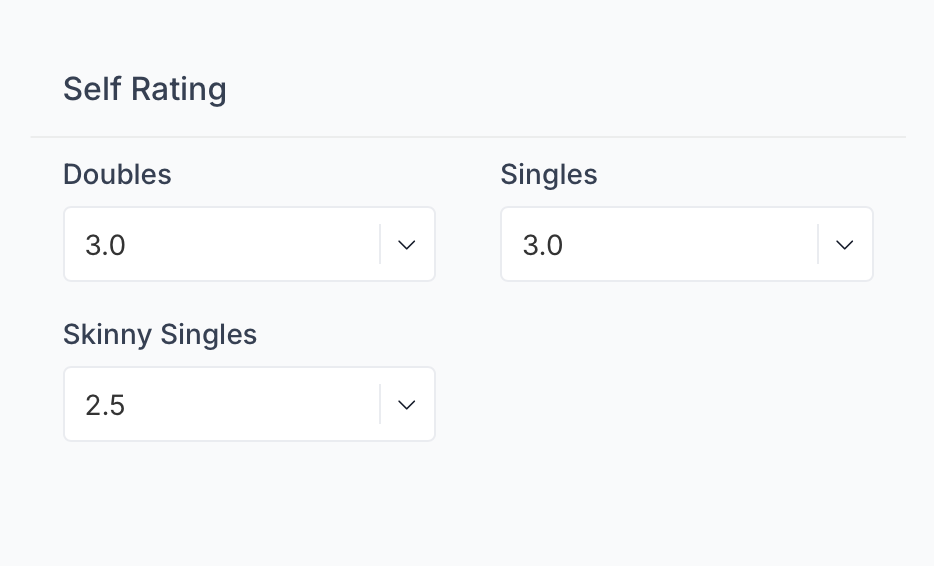
I set my self-rating too high and signed up for a tournament, but the tournament hasn't taken place yet. How do I change it?
Follow the steps above to officially change your self-rating. Once changed, contact the tournament directly and ask them to "update my ratings" for the tournament. Once that is completed, you will be able to edit your registration to the new rated events. See article (How to Edit my Registration" if you need assistance in changing events)
How do I appeal my UTPR (USAP) rating?
Emails can be sent to ratingsadmin@usapickleball.org. Please include any detailed results/information you wish considered for ratings adjustment.
How do I appeal my DUPR rating?
Any requests to appeal your DUPR rating need to go to DUPR directly. Contact them at support@mydupr.com.
Was this article helpful?
That’s Great!
Thank you for your feedback
Sorry! We couldn't be helpful
Thank you for your feedback
Feedback sent
We appreciate your effort and will try to fix the article