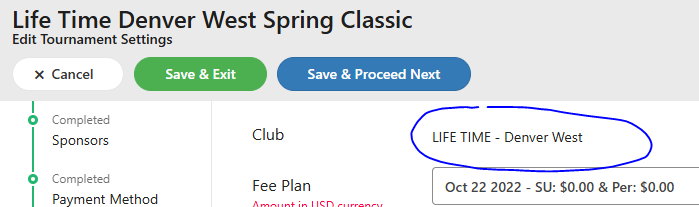
When you create a new tournament, you are asked to select the Club that the tournament will be created under:
When setting up the Registration Cost, you are then asked if you want to give a "Club Discount".

If you change the "use Club Member Cost" to "yes" above, you will see in your registration cost lines "Club Member Pays". Type the fee there to determine what the club member cost would be. In this example, the cost of the tournament is $55, while the club member gets a $5 discount with paying $50.
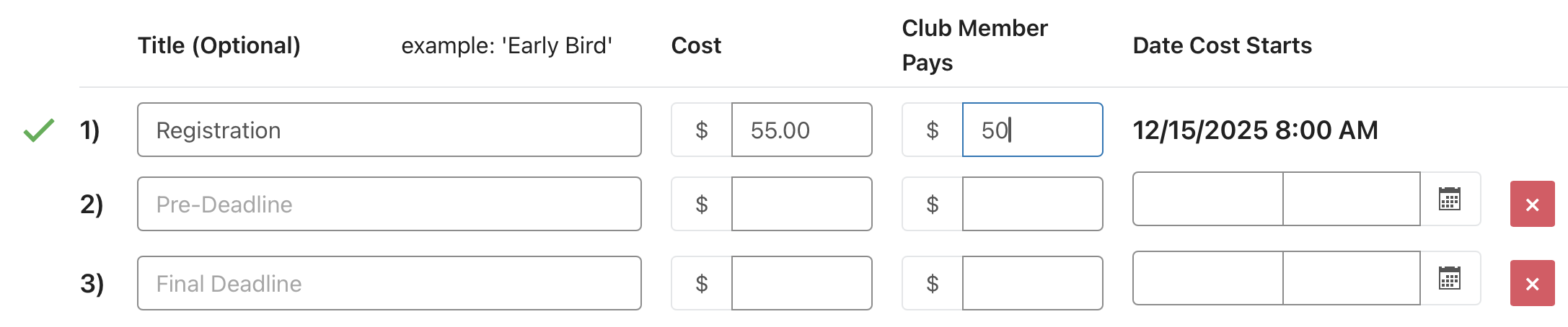
Please note that this feature is NOT looking to see if the player is a Member of Lifetime. This is looking to see if the player is a member of the Club used to create this tournament. In this example, the player must be a member of Life Time - Denver West in order to receive the discount.
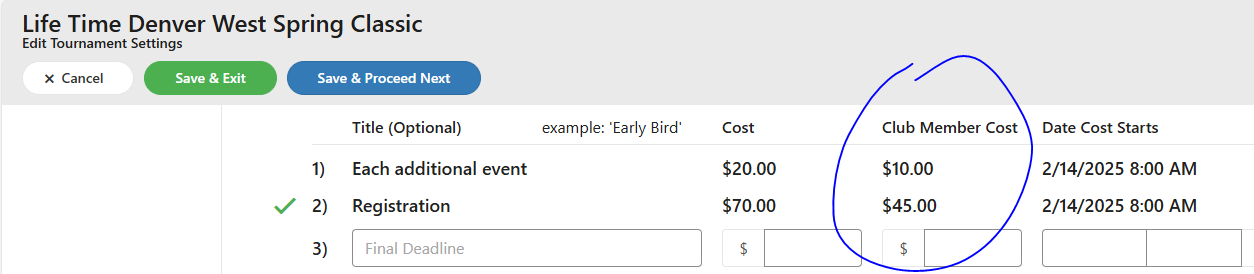
The only thing adding a Lifetime Membership number into the players profile would be used for would be to determine if they qualify to sign up for a tournament that is Sanctioned by Lifetime and is a "members only" tournament. Sanctioning is set by Life Time Corporate office.
Remember, each member who signs up for your tournament needs to be a member of your specific club for the system to automatically recognize that they should receive a club member discount.
Was this article helpful?
That’s Great!
Thank you for your feedback
Sorry! We couldn't be helpful
Thank you for your feedback
Feedback sent
We appreciate your effort and will try to fix the article