The Opt in or Opt Out process is used by players or the league manager to manage attendance for a specific game day.
This article covers how a player may Opt In or Opt Out for a Ladder League Game Day.
TABLE OF CONTENTS
About Opt Ins
When a regular ladder league session is set up, the league manager specifies the opt in date and time range for each game day.
- League managers set the maximum number of players who can opt in for a game day. They can also enable the waiting list. If opt ins are full for the day, players can go on the waiting list and will be automatically opted in if an opening comes up.
- The opt in time period is established by a date range. League managers may allow players to opt in for all game days as soon as they sign up for a session or limit the opt in date range to just the week or only a few days prior to the game day.
- League managers can also opt in players for the game day themselves, depending on who actually attends.
- Players must be opted in to be included in a game day playing group.
Players Opt In Process
Players can opt themselves in from their phones or their computer by:
- Log into their Pickleball.com account
- Selecting Leagues
- My Leagues or My Schedule
- Click on League registered for
- Game Day Button
- Click to Opt In and the display will turn green
Players Opt Out Process
Circumstances happen and there are times when a player has opted in to a game day and are no longer able to attend.
Players can opt themselves out from their phones or their computer by:
- Log into their Pickleball.com account
- Select Leagues
- Click on My Leagues or My Schedule
- Click on League registered for
- Click on Game Day button
- Click to Opt Out and the display will turn red
Understand My League Schedule
Here is a sample of what My League Schedule looks like with explanations of what you might see.
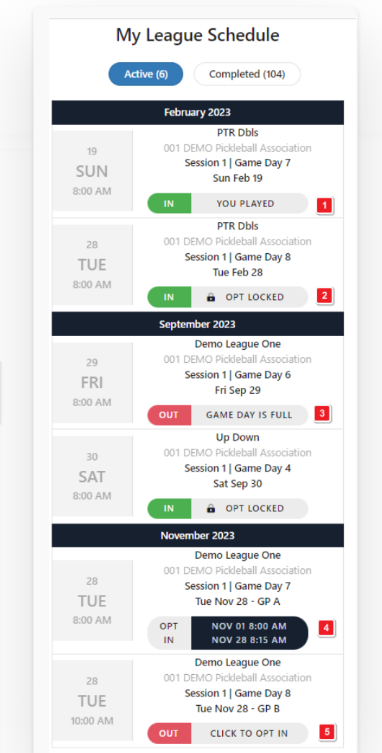
- Indicates a past game day that the player already participated in.
- Indicates that opt in is locked and the player is in. Only a league manager can opt a player out after the game day opt in is locked.
- Indicated that the game day is full and the player is out.
- Indicates that the player is not in but the opt in period has not yet started.
- Indicates that the player is out but may still opt in for the game day.
Was this article helpful?
That’s Great!
Thank you for your feedback
Sorry! We couldn't be helpful
Thank you for your feedback
Feedback sent
We appreciate your effort and will try to fix the article