Auto Redirect will send your players to a third party payment system. This can be used if you are a club (for example) and handle payments internally.
Once logged into your tournament, go to the 3-line menu and select the "Edit Tourney" option then "Checkout Options." Scroll down until you find the Auto Redirect Option. Click Activate after adding the URL information to redirect players to another site to make payment.
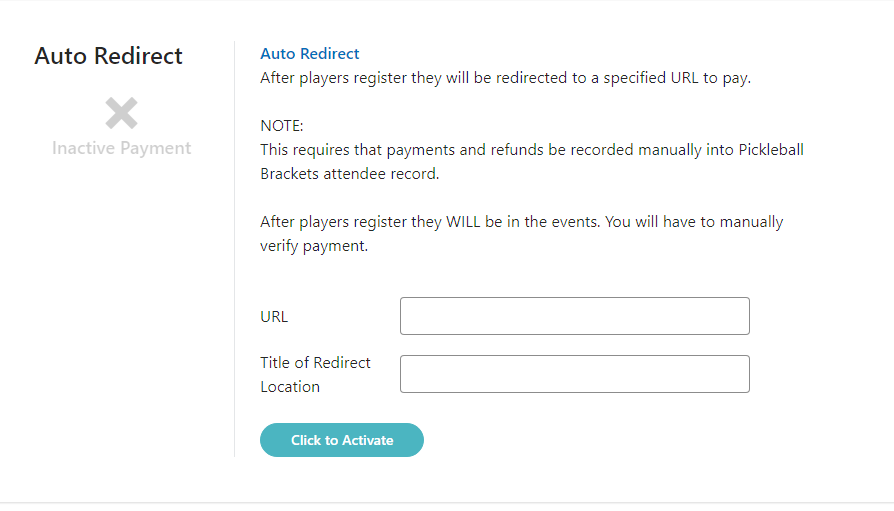
Players paying in this fashion will NOT have their payment information automatically transferred into your tournament. If you want to display their payment in the software, you will need to manually add it in by going to the attendees screen and selecting the Menu and "Record a Payment" option:
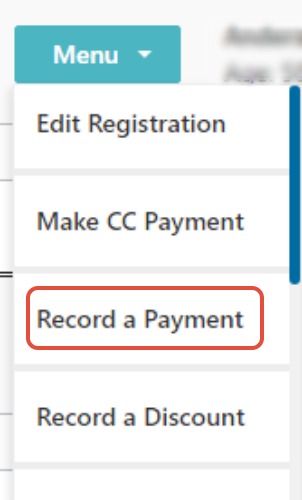
Record a payment doesn't charge the player, it just tells the system to show them as paid as you have accepted payment in another way that isn't connected to our system. If you want to show your players as paid when they check into your tournament on tourney day, you will want to use this feature.
Was this article helpful?
That’s Great!
Thank you for your feedback
Sorry! We couldn't be helpful
Thank you for your feedback
Feedback sent
We appreciate your effort and will try to fix the article